Live Weather Radar Launcher
- 4.2
- Rating
- 1.00M
- Installs
- Free
- Price
 Analysis by App-foxy
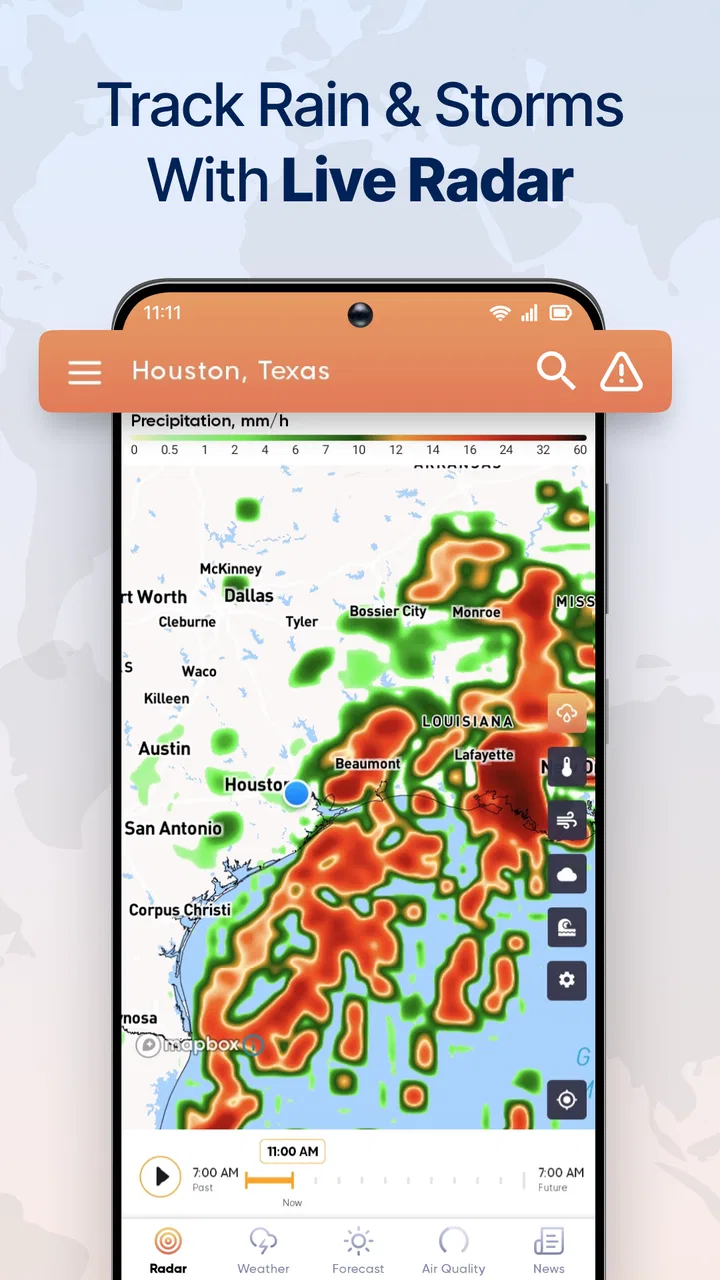
Live Weather Radar Launcher caught my attention because it approaches weather from the part of forecasting I check most often: what is happening around me right now. Rather than treating the forecast as a list of temperatures and symbols, it puts radar movement, temperature patterns, and local conditions at the center. After spending time with it, I found that its strongest appeal is immediate visual context. I can look at a map and understand whether rain is moving toward me, passing nearby, or breaking apart.
That makes it different from the usual weather app I open for a quick temperature check. The app is developed by AtomApplications and is available as a free weather app for everyone. It has built a sizeable audience, with more than a million installs, a 4.3 average from around fourteen thousand ratings, and roughly five and a half thousand written reviews. Those numbers suggest that the radar-first approach is useful to many people, but they do not remove the need to decide whether this style fits your daily routine.
What feels useful during the first week
During the first few days, the live map is the feature that gives the app its strongest sense of purpose. A normal forecast can tell me that rain is expected, but a radar view helps answer the more practical question: should I leave now, wait a little, or take an umbrella? Watching the movement of weather across the map is especially helpful when conditions are changing quickly and a single forecast icon feels too general.
You May Also Like

 Blood Strike: 2.5 Anniversary
Blood Strike’s Loadouts Turn Every Drop Into a Tactical Gamble
A close look at Blood Strike’s custom loadouts: how fast access to signature weapons reshapes its battle royale rhythm, rewards preparation, and narrows the gap between fights.

 Pandora - Music & Podcasts
Pandora’s Music Is Easy to Start, but Harder to Recover
Pandora’s strength is its low-effort path from a seed to a station. Its weak spot is how much confidence it asks you to place in connection, setup, and quiet recovery.

 8 Ball Pool
 Is Built on Rivalries, Rematches, and Routine
A close look at the rivalries, rematches, shared routines, and unanswered safety questions that turn a quick pool match into a persistent mobile community.

 Samsung Music
’s Quiet Strength Is Playing What You Already Own
Its reach comes less from spectacle than from dependable access to a personal library. That simplicity is both the app’s strongest retention engine and its ceiling.

 AccuWeather: Weather Radar
AccuWeather Review: A Quick, Clear Forecast for Everyday Decisions
For everyday plans, the best forecast is the one you can understand quickly. AccuWeather makes rain timing, radar, and local conditions easy to act on, with a few trade-offs.

 Hill Climb Racing
Why Hill Climb Racing Still Turns Crashes Into One More Run
A tiny car, a bumpy hill and one more upgrade: Hill Climb Racing keeps resurfacing because its simple chaos makes every near-miss feel personal.
More From Our News Desk



The launcher concept also makes the app feel more focused than a broad weather dashboard. I am not encouraged to browse through unrelated information before reaching the part that matters. The experience is built around opening the weather view and interpreting it. That directness is valuable for people who regularly make short outdoor decisions, such as walking to work, cycling, taking a dog outside, or deciding whether to start a trip.
The temperature maps add another useful layer. A local forecast gives me a number for my area, while a map shows how that temperature relates to nearby places. That distinction matters when I am traveling across town, heading toward a different neighborhood, or trying to understand why conditions feel different from one location to another. It is not just about knowing whether it is warm; it is about seeing where the warmer or cooler air sits around me.
One of the best early workflows is to use the map before checking the written forecast. I first look for the direction and density of incoming rain, then switch to the local conditions to decide how that pattern affects my plans. This avoids a common mistake with weather apps: treating a percentage or an icon as a complete answer. A radar image gives me a reason to question a forecast when the two do not seem to match.
For example, imagine I am preparing to leave for a short appointment. The local forecast may show rain during the hour, but the radar can reveal whether a narrow band is already moving away or whether a larger area is approaching. I would not treat that visual estimate as a guarantee, but it can change whether I leave immediately or wait. That is a realistic everyday advantage, and it is more useful than simply refreshing a temperature number.
Why the visual approach is easy to appreciate
Weather radar can be more intuitive than a dense forecast screen because movement is easier to understand than a row of symbols. I can see the shape of a weather area and compare it with my position instead of translating several small icons into a mental timeline. This is particularly helpful when the weather is unsettled and conditions vary over a short distance.
At the same time, the app is not a replacement for judgment. Maps can make an approaching system look precise even when the real-world result is less predictable. A colored area on the screen does not tell me exactly how heavy the rain will feel at street level, and it should not be treated as a promise about a particular minute. The app works best as a decision aid rather than an authority that removes uncertainty.
The current release is version 3.9.0, and the minimum requirement is Android 10. That makes it accessible to people using reasonably recent Android devices, though anyone with an older phone should check compatibility before planning around it. I also like that the app is free to try, because the radar-centered design is easier to judge through actual use than through a description. Within a week, most users should know whether the map is something they will open repeatedly or merely an interesting novelty.
Whether it earns a place after the novelty fades
I judge a weather app by whether it keeps helping once the map stops feeling new, and that depends on having a repeatable reason to open it. I’d tie the radar check to a real moment—before a walk, commute, or outdoor errand—rather than browse it out of habit. That makes the next question less about novelty and more about how the current version fits into an everyday routine.
Month-to-month value comes from repeated decisions
After the first impression wears off, the question becomes simple: do I have a recurring reason to open a radar launcher? For me, the answer depends on how often my plans are affected by short-term weather. If I commute on foot, spend time outside, or live somewhere with rapidly changing rain, the app can become a practical habit. Its value is not in showing a map once; it comes from using that map before the same kinds of decisions every day.
People who drive may also find it useful before leaving, especially when a route crosses areas with noticeably different weather. A traditional forecast can be enough for a planned trip, but the map provides more context when the timing is uncertain. I can check whether the weather is localized or part of a broader pattern, then decide whether the route or departure time needs reconsideration.
The app is also a good fit for outdoor routines that are flexible rather than fixed. A runner might use it to choose between going out now or postponing a session. Someone caring for a pet can use it to find a dry interval. A parent organizing a playground visit can compare the local forecast with the movement of nearby rain. These are modest decisions, but they happen often, which is what gives a focused weather tool lasting value.
Its long-term usefulness is weaker for users who only want tomorrow’s high and low. If I rarely look at weather maps, a standard forecast app may be faster and less visually demanding. The radar view is the reason to keep this app, so anyone who does not benefit from spatial weather information may eventually return to a simpler alternative.
How it compares with ordinary weather apps
Most conventional weather apps are organized around a daily forecast, hourly temperatures, alerts, and sometimes a radar tab hidden behind several screens. Live Weather Radar Launcher reverses that priority. The map is not an optional extra; it is the main reason to open the app. That makes it more useful for immediate rain decisions, while a conventional app may be better for planning several days ahead or reviewing a detailed schedule.
I would choose this app over a basic forecast screen when the question is “what is moving toward me?” I would choose a more traditional weather service when I need a compact overview of upcoming days, a wide range of planning tools, or a highly familiar forecast layout. Neither approach is automatically superior. The right choice depends on whether weather is something I observe spatially or simply read as a sequence of numbers and icons.
There is also a trade-off in attention. A radar map invites me to inspect patterns, zoom mentally into nearby areas, and compare movement with my plans. That can be useful, but it can also take longer than glancing at a simple forecast. If I am already late, a visual map may be more information than I need. I found it most efficient when I had a specific question, not when I opened it without a purpose.
Small habits that improve the experience
I get more from the app when I check it at decision points instead of constantly monitoring it. Looking once before leaving and again only when plans change is usually more helpful than repeatedly refreshing the map. This keeps the radar from becoming a source of unnecessary worry, especially on days when scattered showers are possible but not certain.
Another useful habit is to compare the map with what I can actually see outside. If the screen suggests a nearby band but the sky is clear, I treat the map as context rather than a command. This prevents overconfidence in the colored display. The app is strongest when I combine its broad view with local observation and common sense.
I also recommend using the temperature map for transitions rather than isolated checks. When moving from one area to another, the pattern can explain why the destination may feel different even if the general forecast sounds similar. That is a less obvious use than checking rain, and it gives the temperature layer a reason to remain relevant after the initial curiosity fades.
Where maintenance and friction can appear
A weather app has a low maintenance burden compared with many other categories, but it still depends on a few habits. I need to remember to keep the app available, open it when conditions are uncertain, and interpret the map rather than assuming it provides exact local certainty. The biggest ongoing task is not configuration; it is learning when the radar view is worth my attention.
The free price makes experimentation easy, but free access does not automatically make an app effortless. A map-based interface can feel busy, particularly when I only want one piece of information. If I prefer a quiet screen with the current temperature immediately visible, the launcher approach may feel like an unnecessary step. The app’s focus is its strength, but that same focus can feel narrow when my needs change.
There is also a mental maintenance cost in learning how to read movement. At first, colors and patterns can appear more exact than they really are. With use, I became better at treating them as broad signals: nearby rain, approaching weather, or a likely gap. New users should give themselves time to develop that interpretation instead of expecting the first map view to answer every question.
Because this is a live weather tool, I would not rely on it alone for serious safety decisions. For ordinary errands, commutes, and outdoor planning, it is a sensible visual aid. For dangerous conditions, I would also consult official local guidance and use direct caution. That is not a flaw unique to this app; it is a basic limitation of turning complex weather into a phone display.
What may cause fatigue over time
The main source of fatigue is repetition without a clear decision. If I open the map simply to watch weather move, the novelty can disappear quickly. The app becomes more durable when attached to a routine: checking before a walk, confirming a cycling window, or deciding whether to delay a short trip. Without that practical connection, it risks becoming an app I remember only when rain is already falling.
Another possible frustration is the difference between regional information and street-level experience. A radar pattern may cover a broad area, while my actual location experiences only a brief shower or no rain at all. Users who expect minute-perfect precision may become disappointed. I found the app more satisfying when I used it to estimate trends and timing windows rather than demand exact predictions.
The interface may also be less comfortable for people who dislike maps. Some users naturally prefer a written forecast, and no amount of visual detail will make a map feel simpler to them. In that case, a conventional weather app is the better long-term choice, even if this one has a more interesting first week.
Who should install it and who should skip it
I would recommend Live Weather Radar Launcher to anyone whose day changes according to short-term rain or temperature shifts. Walkers, cyclists, outdoor workers, dog owners, travelers moving around a city, and people who regularly plan flexible activities are the clearest audience. The app gives those users a quick way to connect weather movement with a real decision.
I would be more cautious about recommending it to someone who wants only a simple current-temperature widget or a long-range planning tool. Those users may find a standard forecast app more comfortable and faster. It is also not the right choice for someone who expects a radar image to provide certainty down to the minute. The app is informative, but weather remains variable.
For Android users on version 10 or later, the free entry point makes the decision low risk. I would install it, use the radar before several real outings, and judge whether it changes what I do. If it saves me from leaving during a passing shower or helps me find a better outdoor window, it has earned a place. If I keep opening it only out of curiosity, I would remove it and return to a simpler forecast.
My long-term verdict
In my experience, Live Weather Radar Launcher earns lasting space when I treat it as a practical radar tool rather than a complete replacement for every kind of weather information. Its first-week appeal comes from seeing weather move in a way that ordinary forecast cards often fail to communicate. Its month-to-month value comes from repeating that view before everyday outdoor decisions.
The app does have clear boundaries. It can feel too map-focused for quick temperature checks, and visual weather information can encourage more confidence than the situation deserves. It also depends on the user forming a useful habit; without one, the radar becomes an attractive but occasional novelty.
Still, I think AtomApplications has chosen a worthwhile focus. The combination of live radar, temperature maps, and local forecasting gives the app a specific role instead of making it another generic weather screen. With an average of 4.3 and a broad installed audience, it has already shown that this role appeals to many people. My recommendation is straightforward: keep it if you make weather-sensitive decisions several times a week, but choose a simpler alternative if you mainly want a quiet glance at today’s temperature.
For me, that is the test that matters after the excitement fades. I do not need to admire the map every day; I need it to help me decide when to leave, wait, walk, or change plans. When it does that, this free weather app feels useful rather than decorative, and that is enough reason to keep it within easy reach.
FAQs for Live Weather Radar Launcher
01What features does the Live Weather Radar Launcher offer?
The Live Weather Radar Launcher provides real-time weather updates, interactive radar maps, and customizable widgets for your home screen. Users can access detailed forecasts, severe weather alerts, and hourly updates. It also offers a sleek interface that integrates weather information seamlessly with your device's home screen.
02Is the Live Weather Radar Launcher compatible with all devices?
The Live Weather Radar Launcher is designed for both Android and iOS platforms. However, compatibility may vary depending on the device model and operating system version. It's recommended to check the app store listing for specific requirements to ensure it runs smoothly on your device.
03Does the Live Weather Radar Launcher consume a lot of battery?
While the Live Weather Radar Launcher offers detailed and frequent updates, it is optimized for minimal battery consumption. However, like any app that uses location services and real-time data, it may use more battery than standard apps. Users can adjust update frequency and widget usage to optimize battery life.
04Is there a cost associated with using the Live Weather Radar Launcher?
The app offers a free version with essential features. For those seeking an ad-free experience and additional features, there is a premium version available through in-app purchases. Pricing details can be found in the app store under the app's listing.
05How accurate is the weather information provided by the Live Weather Radar Launcher?
The Live Weather Radar Launcher sources its data from reliable meteorological organizations, ensuring high accuracy in forecasts and radar information. While no weather app can guarantee perfect accuracy, this app is generally considered reliable by its user base, offering regular updates and alerts.
Pros
- Accurate weather updates in real-time.
- Customizable widget options for home screen.
- User-friendly interface with smooth navigation.
- No intrusive ads to disrupt user experience.
- Supports multiple locations for travel planning.
Cons
- Consumes significant battery power over time.
- May require stable internet for accurate data.
- Limited customization for notification settings.
- Occasional lag on older devices.
- Premium features locked behind paywall.

Live Weather Radar Launcher
Gallery